How do you read a UDI DataMatrix barcode?
Adrien Lemaire · Published Aug 19, 2026 · Last reviewed Aug 18, 2026
A UDI DataMatrix is not a picture of a number — it is a structured string, and
once you know the structure you can read one off a label without a scanner. Each
field is introduced by an Application Identifier: a two- to four-digit code
that says what the next characters mean. (01) is the device model. (10) is the
lot. (21) is the serial. Learn about six of them and you can decode almost every
medical-device label in the EU.
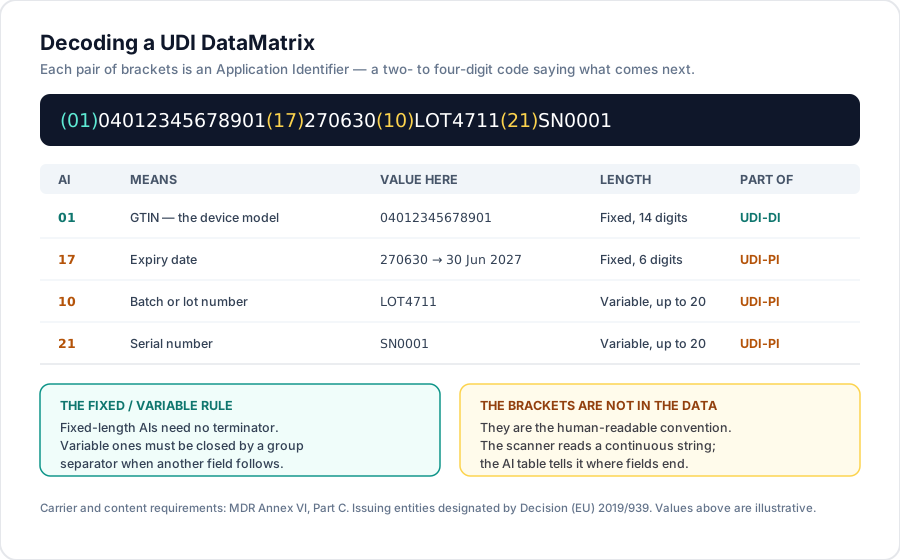
What a UDI carrier actually contains
Under the MDR (Regulation (EU) 2017/745), the UDI carrier on the label must convey the UDI in a machine-readable form — usually an AIDC symbol such as a DataMatrix — plus, where required, a human-readable interpretation. The carrier's content and format requirements sit in Annex VI, Part C, and the encoding itself follows the standard of whichever issuing entity assigned the identifier — for most manufacturers, GS1. Only four entities may issue an EU UDI, designated by Commission Implementing Decision (EU) 2019/939 and renewed to 2029, so the encoding on an EU label comes from one of exactly four systems (on choosing between them, see which UDI issuing entity should you use).
The UDI splits in two, and the DataMatrix carries both:
- the UDI-DI — which model this is;
- the UDI-PI — which unit: lot, serial, expiry, manufacture date, or software version, depending on the device.
The six Application Identifiers you actually need
For medical devices under a GS1-issued UDI, this short table covers nearly everything you will meet on a label:
| AI | Meaning | Length | Part of |
|---|---|---|---|
01 | GTIN — the device model | Fixed, 14 digits | UDI-DI |
11 | Production date (YYMMDD) | Fixed, 6 digits | UDI-PI |
17 | Expiry date (YYMMDD) | Fixed, 6 digits | UDI-PI |
10 | Batch or lot number | Variable, up to 20 | UDI-PI |
21 | Serial number | Variable, up to 20 | UDI-PI |
8012 | Software version | Variable, up to 20 | UDI-PI |
Two conventions matter when you read them. Dates are YYMMDD, so 270630 is
30 June 2027 — not 27 June 2030. And 8012 is a four-digit AI: the code length
itself varies, which is why you cannot simply chop the string into pairs.
The fixed-versus-variable rule
This is the part that catches people, and it is the difference between a string that decodes and one that silently mangles.
- Fixed-length AIs (
01,11,17) have a length defined by the standard. The scanner knows exactly where the field ends and the next AI begins — no terminator needed. - Variable-length AIs (
10,21,8012) do not. When another field follows a variable-length one, it must be closed by a group separator — a non-printing control character. Omit it and everything after runs into the lot number.
That is also why field order is not arbitrary in practice: putting the
variable-length fields last minimises the number of separators, which is why
(01)…(17)…(10)…(21)… is such a common layout.
The brackets are not in the barcode
The parentheses you see in (01)04012345678901 are the human-readable
convention for writing an AI string. They are not encoded in the symbol. What is
actually stored is a continuous run of characters; the AI table is what tells a
reader where each field ends. If you paste a decoded string into a spreadsheet and
see no brackets, nothing is wrong.
Likewise, the human-readable interpretation printed next to the symbol on a label is a rendering of the same data for a human — it is not a separate identifier, and it should match the symbol character for character.
Reading one in practice
Take (01)04012345678901(17)270630(10)LOT4711(21)SN0001:
01→ GTIN04012345678901. That is the UDI-DI, and it is what you would search for in a device database.17→ expires 30 June 2027.10→ batchLOT4711.21→ serialSN0001.
One device model, one lot, one unit. The DI is the part that is registered; the PI values are not held in any public database — not in EUDAMED, not in the FDA's GUDID. If you need to trace this specific unit, that trace lives in your own records.
Doing it without a scanner
MD Atlas parses UDI strings directly: paste or scan one on the scan surface and it splits the AIs, validates the GS1 check digit, and resolves the DI against our indexed subset of EUDAMED — not the complete database — so you land on the device record if it is registered. The reverse direction lives on the DataMatrix generator, which encodes a UDI-PI for label work.
From a decoded DI you can move outward the same way you would from any device record: to the device corpus, to the manufacturer that registered it, and to the certificates recorded in EUDAMED for the family it belongs to. A barcode on a box, read properly, is an entry point into the whole public record.
Reviewed by a regulatory-affairs expert

Audrey Gilbert
Doctor of Pharmacy — expert Quality & Regulatory Affairs consultant in healthcare, helping companies secure and grow their activities
Agila Conseil